Skip to content
Touchtrails – Route Planner at Your Fingertip
  • Trails
  • User Guide
  • English
    • English
    • Deutsch
  • Trails
  • User Guide
  • English
    • English
    • Deutsch

User Guide

⌘K
  • Getting Started
    • Installing TouchTrails
    • Basic Usage
    • Tools
    • Display Modes
    • Premium
  • Route Planning
    • Create Routes
    • Edit Routes
    • Elevation Profiles
    • Routes List
    • Search Places
  • Waypoints
    • Create and Edit Waypoints
  • GPS Tracking
  • Navigation
    • Turn-By-Turn Navigation
    • Route Deviation Alert
    • Optimize Battery Usage
  • Import / Export
    • GPX Import
    • GPX Export
  • Sharing
    • Share as Link
    • Share GPX File
    • Share Image
  • Organize Maps
    • Rename Maps
    • Duplicate Maps
    • Delete Maps
  • Offline Maps
    • Create Offline Regions
    • Rename Offline Regions
    • Delete Offline Regions
    • Limits
  • Settings
    • GPX Import
    • Map Orientation
    • Units of Measurement
    • Manage Subscriptions
  1. Home
  2. User Guide
  3. Settings
  4. GPX Import

GPX Import

GPX files can contain both tracks and routes.
In this setting, you can choose whether TouchTrails should import only tracks, only routes, or both when loading a GPX file.
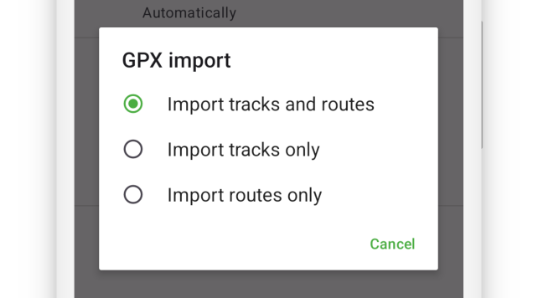

GPX import options in settings

Doc navigation

Map Orientation →
Was this article helpful to you? No Yes
App

Trails
User Guide

Follow

Instagram
Facebook

Press Kit

Legal

Privacy Policy
Imprint

Download
iOS_badge
en_badge_web_generic
Copyright 2025 - TouchTrails by pixelclash | Google Play and the Google Play logo are trademarks of Google LLC.